
Apple Watch Review!

Topics covered
Popular Clips

Episode Highlights
Display
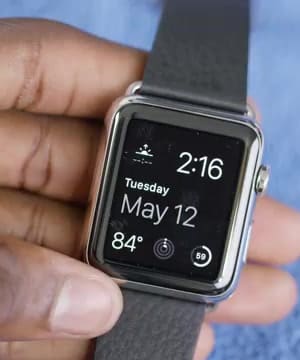
The Apple Watch's display stands out with its impressive LCD screen, boasting 290 pixels per inch. highlights its brightness and sharpness, noting that the blacks are surprisingly deep despite not being an OLED display 1. This quality ensures excellent visibility both indoors and outdoors, making it one of the most comfortable smartwatches he's worn. However, the lack of third-party watch faces is a downside, limiting customization options for users 1.
It's an LCD display at 290 pixels per inch, so it's really bright and really sharp. And yet the blacks get surprisingly black.
---
The display's performance contributes to the overall user experience, though the watch is still considered an accessory for the iPhone.
Battery
Battery life on the Apple Watch is described as average, typically lasting around a day and a half. mentions that while it doesn't comfortably reach two full days, it never dies after just one day 1. This performance is complemented by the watch's efficient gyroscope, which accurately detects when the user is looking at the screen to conserve battery. Despite these features, the watch remains an accessory to the iPhone, not a standalone device.
It's almost always around a day and a half, so it's never lasted a full two days comfortably. But it's never dead after one day.
---
The battery life is adequate for daily use, but users may need to charge it regularly to avoid running out of power.
Notifications
The Apple Watch excels in its notification system, providing discreet alerts with its haptic feedback. appreciates the subtle wrist taps for notifications, which reduce the need to constantly check the iPhone 2. This feature not only saves time but also conserves phone battery by allowing users to dismiss notifications without unlocking their phones. The haptic engine's quality is superior to other smartwatches, offering a clean and precise tap sensation.
The Apple Watch is really good at just quietly tapping me on the wrist and alerting me of a new notification on my iPhone without me having to take my phone out my pocket.
---
This system enhances the smartwatch's role as a convenient extension of the iPhone, focusing on efficient communication.
Related Episodes

Apple Watch Series 4 Review: It's About Time!
Answers 383 questionsApple Watch Series 6 Review: It's Bait!
Answers 383 questionsApple iPad Air Review!
Answers 383 questionsApple iPhone 6 Review!
Answers 383 questions
Apple Watch Series 10 Review: This is It?
Answers 383 questionsApple iPhone 5s Review!
Answers 383 questionsApple Watch Series 5 Review: One Big Tradeoff!
Answers 383 questionsiPhone SE Review!
Answers 383 questionsApple Watch Series 7 Review: Spot the Differences!
Answers 383 questionsiPhone 6s Review!
Answers 383 questionsMoto 360 Review!
Answers 383 questionsOnePlus Watch 2 Review: Total Redemption!
Answers 383 questions2015 Macbook Review!
Answers 383 questionsApple iPhone 6+ Review!
Answers 383 questionsApple iPhone X Review: The Best Yet!
Answers 383 questions